> For the complete documentation index, see [llms.txt](https://help.calcumate.co/llms.txt). Markdown versions of documentation pages are available by appending `.md` to page URLs; this page is available as [Markdown](https://help.calcumate.co/frequently-asked-questions/migrating-to-our-new-high-performance-calculator.md).
# Migrating to Our New High-Performance Calculator
## Migrating to Our New High-Performance Calculator
We've launched a major update to our calculator with significant performance improvements. This guide will help you migrate from the old endpoint to our new, faster calculator.
### Why Migrate?
Our new calculator delivers:
* **90% faster load times** in most locations
* **Reduced file size** from 1.2MB to just 0.2MB
* **Global CDN delivery** through Cloudflare for faster worldwide access
* **Optimized code** with improved dependencies and compression
### Migration Steps
The migration process is simple and only takes a few minutes:
#### Step 1: Access Your Dashboard
Log into your [Calcumate dashboard](https://dashboard.calcumate.co/)
#### Step 2: Update Your Calculator
1. Navigate to your calculator settings
2. Click **Edit** on your existing calculator
3. Click **Publish** to regenerate your integration code
#### Step 3: Update Your Website Code
After republishing, you'll receive new integration code. The key change is:
**New endpoint:**
```html
```
Copy the new code and replace it on your website where the calculator is displayed.
### Performance Comparison
Based on testing from various US locations, here's what you can expect:
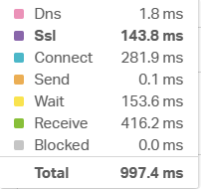
#### Before Migration (Old Calculator)
* **Total Load Time:** 997.4ms
* **File Transfer:** \~1.2MB
* **Connection Time:** 281.9ms
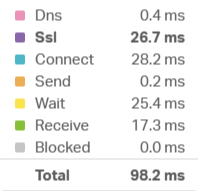
#### After Migration (New Calculator)
* **Total Load Time:** 98.2ms **(90% improvement)**
* **File Transfer:** \~0.2MB **(83% reduction)**
* **Connection Time:** 28.2ms **(90% improvement)**
*Results may vary based on your internet connection and geographic location.*
### Need Help?
If you encounter any issues during migration or have questions about the process, please contact our support team. We're here to ensure a smooth transition to the new calculator.
### Important Notes
* The migration only affects the technical endpoint - your calculator settings, design, and functionality remain unchanged.
* Users will experience faster loading times immediately after migration.
* No downtime is required for this migration process.